
Tuesday, January 13, 2009

I’m a Dare to Dream Different Challenge Semi-Finalist!

D2DDLogo

At Microsoft PDC08 this past November I stopped and talked to the guys in the .net Micro Framework booth (like you do with every other booth at those conferences).  Since I’ve never really worked at a company that built devices that would need this type of technology, this was just one of those “yea that’s neat but I’ll never use it” bits of info.  The one thing I did carry away from our conversation was that they were hosting a contest and were giving away some really neat pieces of hardware to the semi-finalist and even bigger prizes to the finalist.  So, I took one of their flyers and a week or so later I sent in an idea…

The rules for entry were simple.  Come up with an idea of how you would use the .net Micro Framework to make a useful invention and write it up in 250 words or less.  Not much work there.  I had an idea and spent about 20 minutes submitting my entry.  Then I basically forgot about the contest thinking that my idea was probably not sophisticated enough to have a chance.

I was wrong.  On January 8th, I received this email...

Semi-finalist notice email(click to enlarge)

and my name on the contest website…

Semi-finalists List(look for the hick from Shelbyville ;) 

So, what was my idea?  Well, at the time this was all happening I was in the process of installing an invisible dog fence at our house.  I was running the wire so that I could section off different parts of the yard where I might want the dog to run.  He could be isolated to just the area where his dog house was at if we were having a party outside.  He could be allowed to roam the whole backyard, but not the driveway in case visitors were coming and didn’t want to be greeted at their car door by Zeus (yes, he’s as mighty as his name).  Or he could just be allowed to roam the whole yard.  You get the picture. 

To make all this work was either going to require a bunch of manual re-wiring every time I wanted to change the zones where he could run or I was going to have to configure an array of switches which would still take considerable knowledge of the system in order to operate.

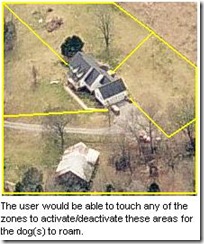
My idea was to create a touch screen interface that would allow a user to simply touch an aerial photo of their yard to configure which zones the dog would be allowed to roam.  Here’s my actual submission…

I would build a touch control system for invisible dog fences. It would show an aerial photo of the owner's property and allow them to touch areas of the yard where the fence should be activated/deactivated. This could possibly be combined with outdoor cameras to allow the owner to control the device over the internet based on where the dogs are currently located.

Invisible fence systems are becoming very popular. However, most are setup as an all or nothing solution. To isolate particular parts of the yard currently requires manual re-wiring or complicated switching systems. This would be a very intuitive tool for controlling these systems.

I'm a professional Windows developer and electronics hobbyist. I am also an invisible dog fence user. I've been planning to build a control system similar to the one described using LEDs and switches, but after meeting with Microsoft at PDC2008 and discussing the possibilities of the .NET micro framework, I'm now excited about the possibilities of this approach. However, I'm unable to justify the cost of the hardware on my own. I had three years of electrical engineering in college before deciding to major in computer science. I can make this work.

and the attached aerial photo of my yard that resembles what the touch screen would look like…
dotnetMicroChallenge

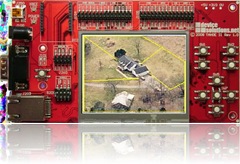
So, now that I’m one of the 50 semi-finalist now what?  Well, my prize for making it this far is that Microsoft will be sending me a Tahoe-II development board and software that I can use to build a working prototype.  The end product of this stage will be a video that I must produce that will demonstrate what I have developed. 
TahoeII-DemoThe Device Solutions Tahoe-II Board 

If my video is selected as one of the five finalist then its off to Microsoft I go to give a live demonstration.  There really hasn’t been any word yet about what the prize is other than there are “$101,000 in prizes and numerous other benefits up for grabs”.  Of course, this contest is more about the geekdom fame than it is about the prizes.  It would look really nice on a resume’.  Who knows, maybe one of the invisible fence manufacturers will take an interest.

While I’m waiting for the board and development kit to arrive, I’ll be working on my model yard (complete with a working LED fence.  You can’t see an invisible fence on the video…) and studying up on the .net Micro Framework.  More to come on that as I progress in the days to come.  I only have until March 31st, 2009 to turn in my video so there’s going to be a lot of late nights in the next few weeks…

Monday, January 14, 2008

Windows Home Server

WHS This week I've been at home taking care of my wife after she had a C-section delivery of our new daughter.  In my free time (when she and the kids are sleeping), I've had some time to work on building a Windows Home Server machine.

I had an old Dell Dimension 2100 laying around that a friend gave me when he upgraded that I decided would be sufficient to at least test an install.  Microsoft recommends you use a machine that has at least a P3 1Ghz processor with 512MB of RAM.  My test machine has a 1.1Ghz P4 processor with 512Ghz of RAM so in theory it should work.

Since the computer only had a 40GB hard drive, I decided that I'd go ahead and invest in a 500GB SATA hard drive since I anticipated needing lots of hard drive space.  This is where my first problem was encountered.  The old Dell doesn't have SATA ports, so I invested about $15 in a VIA VT6421A 3-port SATA RAID controller since I've made a personal vow not to invest in any other IDE hard drives.
Then I ran into my next problem.  The installation disks for WHS come on DVDs and the old Dell only had a CD-ROM drive.  So, I temporarily pulled a DVD-ROM drive out of one of my other machines and popped it in the test machine and started the installation.

The install went smooth.  I told it to install to the new drive and it went through its motions for 30 minutes or so while I went and had lunch.  Then I came back and the install wanted me to reboot to continue.  I did and then found my next problem.  The old machine would not boot off the drive on the add-on SATA controller.  This was a real bummer since I really didn't want to have to use any IDE drives, but not a big issue.  My main machine had an extra 250GB drive in it that I wasn't using for anything yet, so I pulled it out and plugged it into the on-board IDE controller and re-installed WHS.  I then added the 500GB drive and expanded the total capacity of the server to about 700GB (who knows where that extra 50GB went...).
I rebooted and the install finished successfully.  It's alive!  So, then I spent a few minutes exploring the WHS Console which is the only obvious difference between WHS and Windows Server 2003.

Then I installed the Connector software on three machines (a Windows MCE 2005 machine, a Windows Vista Ultimate machine, and a Windows XP Pro laptop).  The install sends you through a wizard that lets you configure backups for the machine you are adding to WHS.  On the MCE 2005 machine, I ran into a problem.  When WHS was examining the machine looking for drives to backup, it came back and reported:
“This computer cannot be backed up automatically because it does not have any hard-drive volumes that are configured with the NTFS file system”.
After spending a few hours researching the problem, I finally found a solution that fixed the problem.  It turns out that some third-party software can modify a registry key that WHS uses and the solution is to set this key back to the value that Windows originally sets it to.  The key is:
HKEY_LOCAL_MACHINE\SYSTEM\CurrentControlSet\Control\Class\{4D36E967-E325-11CE-BFC1-08002BE10318}\UpperFilters

I set the value to "PartMgr" and rebooted and then the backups were configured without problems.
The initial backups ran fine that night and I was quite impressed by their efficiency.  One machine that had 233GB of used hard drive space backed up to 83GB on the WHS server.

One of the really exciting features of WHS is that it allows you to remotely access all of the computers in your home network from anywhere in the world.  No static IPs are required for any of the machines.  From the WHS console, you setup a name for your network and it gives you an address such as https://thelees.homeserver.com which takes care of monitoring your modems public IP address and sets up a public web site where you can configure WHS and access your shared files.  All of this is controlled through user accounts.

This is where I ran into my next problem.  I use a Linksys firewall router to block all incoming traffic from reaching my computers.  After some research, I learned that I needed to setup port forwarding in my router to my WHS server for ports 80, 443, 3389, and 4125.  The last two are specifically needed for Remote Access while the first two are used to connect to the WHS web site.

Now that I have all the basics working, I'm going to "play" with it for a few weeks and check out some add-ins that are available.  I'll write more on individual features as necessary.  Also, I'm going to start researching some better cases that are more suited to lots of hard drive expansion and a motherboard that supports booting from SATA.

So far, the hardware seems to be plenty powerful to make WHS run like a champ.

Friday, January 4, 2008

Special Delivery

Last night as we were getting things ready to head to the hospital in the morning for the delivery of Elizabeth, I decided that I had to find a better way to let everyone know the details of our special delivery. 

For the delivery of the first two boys we did things the "old fashioned" way and just called people.  This is very time consuming and not really what I wanted to be spending my day doing.  Taking care of my girls being the activity of choice.  This is a relatively inefficient means of getting the job done, plus I wanted to be able to send real-time photos out to our family and friends.

SpecialDeliverySo, I thought about this a little and decided that ultimately the easiest way to get this done had to involve using a camera phone to send TXT & PIX messages.  But, I couldn't just add a bunch of recipients to the message every time I wanted to update people because the camera phone I planned to use would only let me add four recipients and I wanted to get the message out to almost 200 email addresses.

My first proposed solution was to just setup a distribution list (group) called "Baby List" in Gmail with all the intended recipients.   Then I would setup a forwarding rule that would forward any messages that arrived that were sent from the camera phone to my Baby List group.  This is where I ran into the first snag.  It turns out that Gmail will not let you setup a forwarding rule that forwards to a group.  In fact, it will not let you forward to more than one person for a single rule.  I could have setup 200 different rules, but that would have taken longer than just making the calls...

Then I had another idea...  I could use Microsoft Outlook to check my Gmail account using POP3 and setup the rule there.  Outlook will not let you forward to a distribution list, but it will let you attach an almost infinite list of email addresses to the rule as long as they are separated by a semicolon.  So, after doing some data massaging to get a semicolon delimited list of the addresses I had stored in Gmail into my Outlook rule, it was time for a test.

For the first test, I set the rule to just forward back to my Gmail email address.  This way if something didn't work, 200 people didn't know about it ;)  I took a picture with the camera phone and sent it via a PIX message to my Gmail address.  MS Outlook, which was running on my home computer, then picked up the message from Gmail and processed the rule which automatically forwarded it back to my Gmail address.  Success!

Then it was time for the real test...  I put the 200 or so email addresses onto the rule and repeated the test.  I had been concerned about having so many email addresses in one message and it turned out that my concerns were warranted.  The first 50 or so people received the message without any problems and then I got a message back stating that there were "too many recipients". 

Well, the solution to this was easy.  I split the mailing list up into three equal size lists and created three identical forwarding rules but with different distribution lists for each rule.  Problem solved.  Time to get some sleep before the big day.

This solution worked like a charm.  I was able to snap photos of Elizabeth during delivery and instantly forward them out to all my friends and family without ever dialing a single phone number (assuming they were checking their email).

Had I decided to start on a solution to this problem farther in advance, I probably would have written a more robust solution using my PocketPC phone.  But, given the short time constraint that I had to solve this problem I think it worked out pretty good.  If you ever need to solve a similar situation where you need to keep a long list of people notified of an activity in near real-time, give it a try.

Welcome Elizabeth Rose Lee

Today, I saw the third miracle of my life (the first being the birth of Ian, Jr. and the second being the birth of Zander).  We welcomed into the world Elizabeth this morning at 9:41 AM after a Cesarian delivery at the Middle Tennessee Medical Center in Murfreesboro, TN.  She came out proving that she was her momma's girl.  In other words, she came out screaming ;)  She weighs a whopping 6lb 10oz and is 19 1/4" short. 

The boys took right to her.  Jr. can't keep his hands off her and Zander offered up his pacifier.  The most gracious of gifts a big brother can offer.  It appears that I'll have plenty of help fighting the boys off in a few years.

Well, its time to go feed the little one and get a little rest.

Oh, yea, happy 33rd anniversary Pam & Kevin (Rebecca's parents)!

Check out more of Elizabeth's birthday pictures here.

Wednesday, December 19, 2007

Merry Christmas!

.NET Custom Configuration

This week I had to create a relatively simple Windows console program that would be scheduled nightly to email a report to a client. Simple enough, right?

Well, I decided I to make the program a little more flexible so that I could easily add more reports later if needed and specify through command-line arguments which report would be run.

So, I decided I would try and make a custom configuration section in the app.config file that would look like this...

  <Reports>
<
add name="DailyProductionRpt" emailTo="customer@some.com" lastRun="12/15/2007"
/>
<
add name="NavyMonthlyProduction" emailTo="customer@some.com" lastRun="11/30/2007"
/>
</
Reports
>

Sounds simple enough, huh? This looks just like the <connectionStrings> section so there should be a million examples on the web on how to do it, right? So, I started Googling for examples on how to implement a custom section handler and found a lot of great examples on how to create a custom section if you want to put the collection element inside another element such as like this...

  <MyCustomSection>
<
Reports
>
<
add ...
/>
<
add ...
/>
</
Reports
>
</
MyCustomSection
>

But, I didn't want that extra element and didn't see any need to include it. So, after spending several days working on this between other tasks I finally got it working. I'm posting my solution here since there doesn't appear to be an example like this anywhere else on the web.


First you have to add this code to the <configSections> section of your app.config file...

  <configSections>
<
section name="Reports" type="MyCompany.DataDelivery.ReportsConfigSection, DataDelivery"
/>
</
configSections
>

Where "ReportsConfigSection" is the name of the section handler class and "DataDelivery" is the name of the assembly where it exists.


Here's all the custom section handler code that had to be implemented...

using System;
using System.Collections.Generic;
using System.Configuration;
using System.Text;

namespace MyCompany.DataDelivery
{
/// <summary>
///
The Handler for the custom "Reports" configuration section.
/// </summary>
public sealed class ReportsConfigSection :
ConfigurationSection
{
private static ReportsCollection _reports;

public ReportsConfigSection()
{
_reports = (ReportsCollection)base[""];
}

[ConfigurationProperty("", IsDefaultCollection = true, IsRequired = true)]
public ReportsCollection Reports
{
get
{
_reports = (ReportsCollection)base[""];
return _reports;
}
}

public ReportElement this[int idx]
{
get
{
return Reports[idx];
}
}

public ReportElement this[object idx]
{
get
{
return Reports[idx];
}
}
}

/// <summary>
///
This defines the Reports collection element.
/// </summary>
ConfigurationCollection(typeof(ReportElement))]
public class ReportsCollection :
ConfigurationElementCollection
{
protected override ConfigurationElement CreateNewElement()
{
return new ReportElement();
}

protected override object GetElementKey(ConfigurationElement element)
{
return ((ReportElement)element).Name;
}

public ReportElement this[int idx]
{
get
{
return (ReportElement)BaseGet(idx);
}
}

public ReportElement this[object idx]
{
get
{
return (ReportElement)BaseGet(idx);
}
}
}

/// <summary>
///
The class that holds onto each element returned by the configuration manager.
/// </summary>
public class ReportElement :
ConfigurationElement
{
[ConfigurationProperty("name", DefaultValue = "", IsKey = true, IsRequired = true)]
public string Name
{
get
{
return ((string)(base["name"]));
}
set
{
base["name"] = value;
}
}

[ConfigurationProperty("emailTo", DefaultValue = "", IsKey = false, IsRequired = false)]
public string EmailTo
{
get
{
return ((string)(base["emailTo"]));
}
set
{
base["emailTo"] = value;
}
}

[ConfigurationProperty("lastRun", DefaultValue = "", IsKey = false, IsRequired = false)]
public DateTime LastRun
{
get
{
return ((DateTime)(base["lastRun"]));
}
set
{
base["lastRun"] = value;
}
}
}
}

I'm still not sure that I understand everything happening here, but it works and you should be able to easily adapt it to your needs if you need a custom top-level collection element in your configuration file.

Microsoft Live Maps

Once again, I am overwhelmed by the advancements made in online mapping software. I was first wowed by Google Maps when several years ago they came out with the interactive Web 2.0 interface and I've been a loyal follower every since. Well, yesterday I tried out the new Microsoft Live Maps and I must say that I have been wowed again.

I live in a very rural area and the big test for the abilities of a mapping program has been to see if it can see my house in as high a resolution as has been available in larger cities for some time now. Currently, this is the best I can get from Google Maps.

Google Map of my home.

Not very impressive. So, I was playing around with Windows Live Writer yesterday and tried out its Insert Map feature which sent me to Live Maps. I entered in my home address and this is what I got!

MSVirtualEarth

There are also some other amazing features such as the ability to rotate around my house and see it from all angles. I can't imagine how they get all the imagery to make this possible, but it's very impressive.

There appear to be a lot of other features in Live Maps that I've been wishing for and I'll be spending more time playing with in the near future. But, one thing seems certain...

Adios Google Maps!